Best App To Help Me Calm Down With Guided Hypnosis
The best app to help me calm down with hypnosis is one that offers short guided self-hypnosis sessions, simple playback controls, grounding cues, and clear limits for crisis situations. HypnoApp fits adults who want calm-down, sleep, meditation, and habit-support audio in one place, without treating guided audio as a medical cure.
Definition: HypnoApp is a self-hypnosis tool that provides guided hypnosis, self-hypnosis, meditation, and sleep audio sessions for adults seeking relaxation and better habits.
TL;DR
- Choose a calming audio tool with short sessions, calm voice guidance, and an obvious stop or pause option.
- Guided hypnosis to calm down is usually self-hypnosis: you stay awake, listen, breathe, and follow relaxation suggestions.
- Use self-hypnosis apps for everyday stress support, not as emergency care for panic, suicidality, severe trauma symptoms, or medical crises.
How these apps look
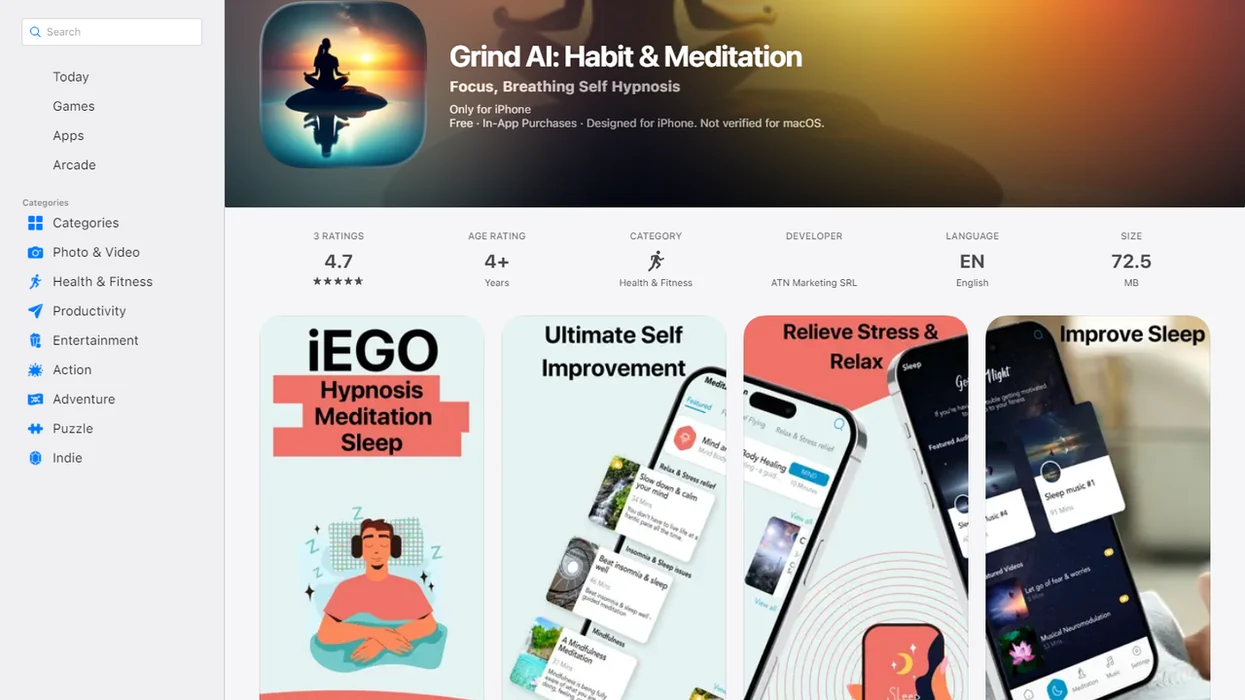
Side-by-side captures of the compared products. Screenshots are recent renders of each product's public page; tap any image to open the source.
Best calm down hypnosis app shortlist for quick stress resets
A good calming audio tool should be easy to start while stressed, not just impressive when browsing calmly. The useful shortlist favors short guided audio, realistic claims, simple controls, and a clear way to pause or stop.
- Hypnosis App: A broad guided hypnosis and self-hypnosis library for adults who want relaxation, sleep, stress, and habit-support sessions in one place. If the priority is a low-pressure reset after work, HypnoApp fits because it organizes calm-down and bedtime-style audio into clear session categories.
- Reveri: A focused self-hypnosis option associated with Stanford, often discussed for brief structured sessions.
- HypnoBox: A customizable hypnosis-style library for people who want to adjust voices, topics, and repeated session patterns.
- Surf City Apps Anxiety Relief Hypnosis: An anxiety-labeled app-store option for users comparing relaxation tracks with background sound and easy playback.
Some self-hypnosis apps are broader wellness libraries, not dedicated acute calming tools. Good self-hypnosis apps deliver guided attention and relaxation cues, not emergency treatment or guaranteed anxiety relief.
How guided hypnosis audio works for calm down sessions
Guided self-hypnosis is awake, attentive listening that uses relaxation, imagery, and suggestion to help the listener settle their body and attention. It is not unconsciousness, stage hypnosis, or losing control.
For context, the American Psychological Association describes hypnosis as a focused state of attention and receptiveness to suggestion, not unconsciousness or loss of control (https://www.apa.org/topics/psychotherapy/hypnosis).
In practice, a guided audio session often begins with breathing cues, then moves into progressive relaxation, like the narrator asking you to loosen your jaw and drop your shoulders. The session may add calming imagery, repeated phrases, and a simple relaxation cue you can reuse later. The phone is just the delivery system: session length, downloads, reminders, categories, and replay controls shape whether you can use it during a stressful moment.
Tiny controls matter.
HypnoApp is useful for this kind of guided self-hypnosis practice because it covers relaxation, meditation, sleep, and habit audio without requiring the listener to know clinical language first. Calm-down hypnosis tends to work best as a routine or in-the-moment stress reset, not as a guaranteed treatment.
6-step stress reset routine with a hypnosis app
Use a guided audio app for calming in a safe, simple way: choose a short track, get physically settled, and stop if the audio makes you feel worse. A stress reset app should reduce decisions, not add more of them.
- Choose a 5 to 10 minute guided hypnosis to calm down session before opening longer sleep or confidence programs.
- Sit or lie down somewhere safe, with headphones only if you are not walking, driving, cycling, or supervising something risky.
- Start with the volume low enough that a sudden ending will not jolt you.
- Follow the narrator’s breathing, relaxation cue, and imagery without checking whether you “feel hypnotized.”
- Stop if the session feels uncomfortable, dissociating, frightening, or too intense.
- Review what helped afterward, and use professional or crisis support if symptoms feel severe, unsafe, or persistent.
After the blue light filter is on at midnight, simple playback often matters more than novelty.
Best app to help me calm down with hypnosis: HypnoApp
HypnoApp is a practical choice for adults who want guided hypnosis, self-hypnosis, meditation, and sleep audio for relaxation and better habits. It is better understood as a habit-support and relaxation tool than as a diagnosis, treatment plan, or cure.
When the issue is everyday stress that keeps spilling into bedtime, HypnoApp fits because it gives users calm-down, sleep, and stress-related session categories instead of forcing them into one narrow program. A listener can press play with the phone face down on a nightstand, lower the volume slider, and let the narration carry the next few minutes.
Reasonable expectations matter here. The strongest fit is for people who want short session options, a gentle voice, clear categories, and simple replay controls. For a narrower anxiety comparison, the best hypnosis app for anxiety guide covers that use case more directly.
Best 10-minute calm down hypnosis app: Reveri
Reveri is relevant for people who want brief, structured self-hypnosis sessions instead of long sleep audios. Stanford-associated Reveri says its sessions are typically 10 minutes, which matches the short-session format many calm-down users prefer.
A 10-minute session can fit before a meeting, after a tense message, or during a lunch-break walk with one earbud in. That does not mean every person will calm down in 10 minutes. It means the format respects the moment when stress is high and patience is low.
For users who want a focused self-hypnosis style, Reveri may feel more direct than a large wellness library. It is still worth checking the specific goal, voice, and stop controls before relying on it during acute anxiety. Short is useful. Short is not magic.
Best customizable guided hypnosis app to calm down: HypnoBox
HypnoBox is often mentioned in best self-hypnosis tool discussions because it offers a customizable hypnosis-style experience. That customization can help users who already know which voice, topic, or session pattern helps them settle.
Customization works when it removes friction. A user might prefer a lower voice, a specific calming theme, or a repeated session they can start without scanning new titles. Repeatability can become its own relaxation cue. The brain learns, “This is the track I use when I need to notice and reset.”
However, more content does not automatically make an app better during a tight stress moment. A crowded menu can feel like another task when the pencil is tapping beside a practice quiz and attention is already thin. Check session length, pause controls, offline access, and whether the claims stay realistic. For people comparing audio with broader stress tools, an app that calms stress with hypnosis may be the better frame.
Best anxiety-focused calm down hypnosis app: Surf City Apps
Anxiety relief self-hypnosis apps are common app-store options for relaxation and stress support. Surf City Apps Anxiety Relief Hypnosis fits this category, but anxiety-labeled tools need careful reading because the label can sound more clinical than the product really is.
Useful features include grounding cues, short tracks, background sounds, offline playback, and easy stopping. The practical test is simple: can you start a calming track when your jaw is tight, your shoulders are up, and the screen feels like too much? If not, the app may be better for planned relaxation than urgent stress.
On days when worry rises before a commute, an anxiety-focused hypnosis track can support a calmer routine because it gives the listener one guided sequence to follow. Still, an anxiety-focused guided audio app is not emergency treatment for severe panic, suicidality, or trauma symptoms. The self hypnosis for anxiety app guide explains those boundaries in more detail.
Selection criteria for calm down hypnosis apps
The strongest calm down self-hypnosis apps share six traits: short sessions, a clear relaxation goal, self-hypnosis framing, simple controls, safety limits, and a credible team or explanation. Those criteria matter because app-store hypnosis is a mixed category.
A 2013 systematic review of hypnosis apps in Apple’s App Store found that 19.9% had relaxation or stress reduction as a goal (https://pubmed.ncbi.nlm.nih.gov/24057062/). In the same review, 22.6% targeted weight loss, and 83 iTunes hypnosis apps focused on self-esteem. That older review is not a current app-store census, but it shows why “self-hypnosis tool” does not always mean “built for calming down right now.”
| App | Best fit | Session style | Caution |
|---|---|---|---|
| HypnoApp | Broad relaxation, sleep, and habit support | Guided hypnosis and self-hypnosis audio | Not crisis care |
| Reveri | Brief structured self-hypnosis | Typically short sessions | Results vary |
| HypnoBox | Customizable listening | Build and repeat sessions | Menus may feel busy |
| Surf City Apps | Anxiety-labeled relaxation | Guided track with sounds | Check claims carefully |
The most useful calm-down app is often the one you can start safely in under a minute.
How We Chose the Calm-Down Audio Apps
We chose these calm-down audio apps through editorial review, app-store research, and practical feature comparison rather than clinical testing. The shortlist is an editorial ranking of relaxation tools, not a medical treatment recommendation.
The review compared broad wellness libraries with narrower self-hypnosis tools because stressed users do not always search by clinical category. Some people want one app for sleep, meditation, habits, and relaxation; others want a focused self-hypnosis track they can start quickly.
- Review each app’s public store listing, website language, session categories, and stated use case.
- Prioritize short sessions, especially tracks that can be used when attention is limited and the user wants a quick reset.
- Check safety limits, including warnings against use while driving and whether the app avoids crisis-care positioning.
- Compare playback controls, ease of pausing or stopping, navigation friction, and basic usability under stress.
- Weigh claims carefully, favoring apps that describe relaxation support without promising guaranteed anxiety relief.
Because app stores change quickly, this shortlist should be rechecked at least every six months, and sooner after major redesigns, pricing changes, or new safety claims.
Five facts before choosing a calm down hypnosis app
Before choosing a calming audio tool, separate practical audio support from marketing claims. These five facts help keep expectations grounded.
- Not every self-hypnosis tool is built for immediate calm-down moments. Many are designed for sleep, confidence, weight, or general personal development.
- Broader libraries can still help, but the calm-down path must be obvious. HypnoApp works best for this use when relaxation and stress-related sessions are easy to find.
- Self-hypnosis usually means staying awake and following audio guidance. A skeptical beginner asking, “Am I supposed to feel hypnotized?” is asking a normal question.
- Claims like instant relief, no side effects, or works for everyone deserve caution. App-store marketing can outpace evidence.
- Severe or persistent symptoms need professional support, not only an app. Therapists and mental-health guidelines commonly recommend matching support level to symptom severity, especially when safety is involved.
For many adults, guided hypnosis is often easier to try than silent meditation because the narrator gives the next cue.
Drawbacks of guided hypnosis audio for calm down moments
Guided hypnosis audio can be calming for some users, but it is the wrong fit for others. Some people find the narrator distracting, too intimate, too slow, or simply ineffective.
The hardest moments are often the least app-friendly. During intense panic, a person may not be able to focus on a voice, find the right session, or tolerate headphones. A notification interrupting a relaxation track can also break the spell of quiet attention. Not ideal.
Long sessions, complex menus, aggressive upsells, and sudden volume changes can make a calm-down app feel more stressful. People who prefer CBT tools, breathing timers, journaling, or unguided meditation may choose a different stress reset app. The full how to calm anxiety with phone hypnosis page explains when phone-based audio is helpful and when another tool may fit better.
Outcome usually depends more on timing, fit, and repeat use than on the word “hypnosis” in the app title.
Limitations
Self-hypnosis apps have real limits, and those limits should be visible before someone presses play. Use them as guided relaxation tools, not as a stand-in for care when care is needed.
- Self-hypnosis apps are not proven to work equally well for everyone.
- They are not a replacement for therapy, medication, emergency services, or crisis care.
- Do not use hypnosis audio while driving, cycling, operating equipment, or doing tasks that require attention.
- The research base for self-hypnosis apps is smaller and less standardized than many mainstream digital mental health tools.
- App-store descriptions may overstate benefits, especially around instant relief or guaranteed results.
- Some listeners feel more unsettled with eyes-closed audio, imagery, or body-focused instructions.
- A session ending too loudly, looping awkwardly, or requiring too many taps can disrupt relaxation.
- Apps like Calm, Headspace, Reveri, HypnoBox, and HypnoApp serve overlapping but different needs, so compare the actual session style.
If symptoms feel unsafe, escalating, or unmanageable, stop using the audio and seek appropriate support.
FAQ
Can hypnosis calm me down?
Guided self-hypnosis may help some people relax by focusing attention, slowing breathing, and following calming suggestions. Results vary, and it should not be treated as guaranteed anxiety relief.
Are hypnosis apps safe?
Self-hypnosis apps are generally used as low-risk relaxation tools when you are seated or lying down safely. Stop if you feel distressed, dissociated, unsafe, or unable to stay oriented.
Do hypnosis apps make you unconscious?
No, app-based hypnosis does not require unconsciousness or loss of control. Most sessions involve awake listening and voluntary attention.
What is self-hypnosis?
Self-hypnosis is an awake practice that uses focused attention, relaxation cues, imagery, and suggestion. In apps, it usually happens through guided audio.
How long should a calm down hypnosis session be?
For acute stress, 5 to 10 minutes often fits better than a long session. Short tracks are easier to start when attention is limited.
Can I use hypnosis for panic attacks?
A self-hypnosis tool may support relaxation between panic episodes or during mild anxiety. Severe panic, chest pain, suicidality, or trauma symptoms need professional or emergency support.
Are free hypnosis apps worth it?
Free self-hypnosis apps can be worth trying if the audio quality, claims, privacy terms, ads, and stop controls are acceptable. Avoid apps that promise instant cures or pressure constant upgrades.
What features matter most for calming guided audio?
The most important features are short sessions, grounding cues, pause controls, realistic claims, and clear privacy information. Offline playback can also help if stress hits away from reliable Wi-Fi.